




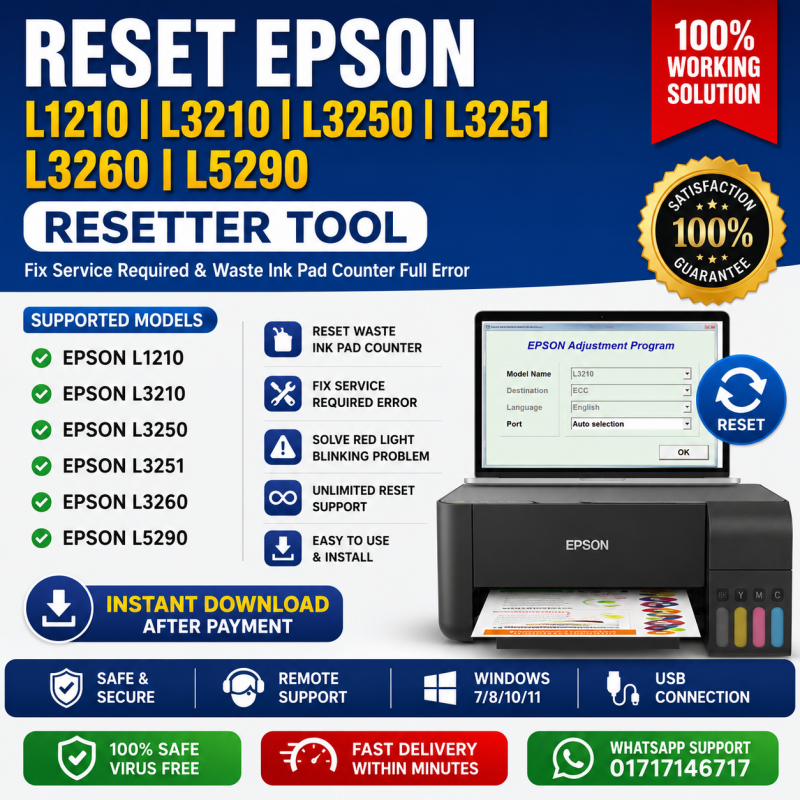
Epson Resetter Tool for L1210, L3210, L3250, L3251, L3260 & L5290
Inhouse product

Epson Resetter
Tool for L1210, L3210, L3250, L3251, L3260 & L5290
Buy
original Epson adjustment program resetter tool for supported Epson EcoTank
printers.
This
resetter helps solve:
- Service Required
Error
- Waste Ink Pad
Counter Full
- Red Light
Blinking
- Ink Pad End of
Service Life Error
Supported
printer models:
- Epson L1210
- Epson L3210
- Epson L3250
- Epson L3251
- Epson L3260
- Epson L5290
Key Features
·
Reset
Waste Ink Pad Counter
·
Remove
Service Required Error
·
Fix
Blinking Red Light Problem
·
Original
Adjustment Program
·
Easy
Installation
·
Instant
Download
·
Activation
Support
·
Remote
Support Available
What
Problems Does This Resetter Fix?
This
Epson resetter tool fixes the following issues:
Service Required Error
If
your printer shows “Service Required,” reset the internal counter instantly.
Waste Ink Pad Counter Full
Reset
waste ink counter and continue printing normally.
Red Light Blinking Problem
Fix
continuous blinking light errors on supported Epson printers.
Ink Pad End of Service Life
Clear
ink pad end-of-life warning messages.
How to Use Epson Resetter Tool
Step 1
Download
the resetter after purchase.
Step 2
Install
on Windows PC.
Step 3
Connect
printer using USB cable.
Step 4
Open
adjustment program.
Step 5
Select
printer model.
Step 6
Reset
waste ink pad counter.
Step 7
Restart
printer.
Done!
Your printer is ready to use again.
System Requirements
- Windows 7
- Windows 8
- Windows 10
- Windows 11
- USB Connection
Required
Delivery
Information
- Product Type:
Digital Product
- Delivery Method:
Download Link
- Delivery Time:
Instant / 5–30 Minutes
- Support:
WhatsApp / Remote Support
Why
Buy From Us?
- Genuine working
software
- Fast delivery
- Affordable price
- Technical
support included
- Bangladesh-based
support
Which
Epson printer models are supported?
Supported
models:
- Epson L1210
- Epson L3210
- Epson L3250
- Epson L3251
- Epson L3260
- Epson L5290
Does this resetter work for Epson
L3210?
Yes,
this tool fully supports Epson L3210.
Can
I reset Epson L3250 and L3251?
Yes,
both:
- Epson L3250
- Epson L3251
are
fully supported.
Is Epson L1210 supported?
Yes,
Epson L1210 reset is supported.
Does
it support Epson L3260?
Yes,
Epson L3260 is supported.
Can
I reset Epson L5290?
Yes,
Epson L5290 reset is available.
Is
this software safe?
Yes,
this is a tested adjustment program.
How
do I receive the software?
After
payment, download link will be shared instantly.
Do you provide installation support?
Yes,
remote support available via AnyDesk and WhatsApp.
Call
to Action
Buy Epson Resetter Tool Now
Fix
your Epson printer error instantly with original resetter software.
Call/WhatsApp:
01717146717 & 01703344123
Website: www.idealtechbd.com
Related products

Ideal Technology BD
is one of Dhaka’s leading printing and office‐tech providers. Our PrintPro Solutions division offers high‐quality printers, genuine color and
monochrome toner cartridges, on‐site maintenance, and consumables management.
Additionally, we provide office‐tech services including network infrastructure,
hardware supply, and workflow optimization. Committed to customer success with
competitive pricing and prompt response, Ideal Technology BD
is your trusted office‐tech partner.
Contact Info
- Address: Gulshan-2 Branch: DNCC Market (2nd Floor) , Suite: 107, Gulshan-2, Dhaka-1212 _______________________________________________________ Service Center: House: 119 Zaman Bhaban (3rd Floor), Nayanagar, Gulshan, Dhaka-1212
- Phone: 01717146717, 01703344123, 01711757481-84
- Email: ashraful@idealtechbd.com; info@idealtechbd.com